Special Price HP Envy 5530 Inkjet Multifunction
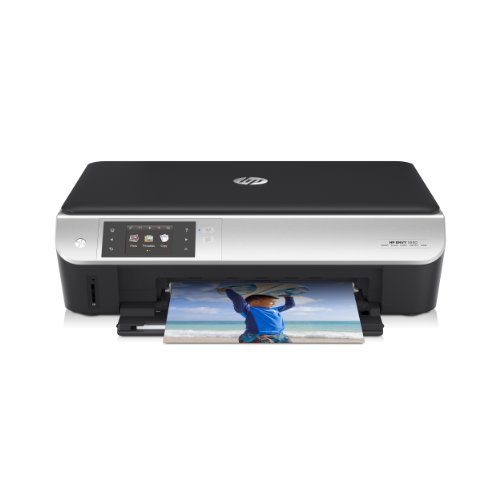 Click image for more information[/caption]
HP Envy 5530 Inkjet Multifunction Printer - Color - Photo Print - Desktop
today Ich stelle important Information for you, you can get HP Envy 5530 Inkjet Multifunction Printer - Color - Photo Print - Desktop at a better price for this day. But before you continue reading, please see reviews about HP Envy 5530 Inkjet Multifunction Printer - Color - Photo Print - Desktop below.
>>> For more information, please click here
A Tale of Two Printers
Every time I've bought a computer printer in years past, I've agonized about whether to go with Epson or HP (I never really considered Brother, Canon or Lexmark, for reasons shrouded in the mists of time). Both Epson and HP have pretty good reputations for performance and reliability. In my experience, both brands' printers make good-quality prints. Both companies have printers with comparable features for similar prices. Ink usage and replacement cartridge prices are pretty much a wash. Having said that, I've been looking to replace two old printers recently. One is an HP LaserJet 4 with a damaged drum. It would cost far more to fix than it's worth (plus the toner cartridges are obscenely expensive). The other is an HP DeskJet 1120C. It still works, but I don't need its 11"-x-17" paper size capability, and it is glacially, unbearably slow.
Thanks to Amazon's Vine program, I have now not only replaced my old printers, but I've done so in a way that I hope potential buyers...
HP Envy 5530 Inkjet Printer
There is a place to choose your paper type. It is important that you do this. One choice is HP paper -- There is also a choice for OTHER printer paper. I think it's wise to make the correct paper selection so as to avoid problems with paper feed. I have had very few problems. This printer is doing its paper feed as well as any.
Print quality is excellent. I am VERY happy with this machine. The fact that it isn't wasting colored ink every time it prints just black is a real blessing.
Highly recommend this product. DO select the proper paper type.
best home printer
Nowadays, setting up a new printer can’t get easier. Unboxing and setting this printer up to get ready for some printing, scanning, and copying took about 15 minutes total. I did not have to install any software or driver on my Mac; all I had to do was connect the printer to my home internet.
Basically, I took the printer out of box, powered on, put the inks (combined color cartridge and black cartridge), then waited for the printer to print out alignment testing, and then I scanned that paper as instructed on the color LCD screen on the printer. Then the printer showed that the alignment and calibration was successful. One last step was to connect to my home WIFI. My network name was hidden (not broadcasting) and there was option I can manually type in the SSID name. As I expected, the printer did not recognize 5 GHz N network, but had no problem connecting to 2.4 GHz network. Once the printer was connected to the internet, it asked if I want to enable...
Product Description
Key Specs Product Overview • Produce borderless, lab-quality photos and tackle more tasks for less • Print wirelessly—and control this e-all-in-one—from your smartphone, tablet and Internet-connected PC • Walk up, edit, and print photo projects directly from the 2.65" color touchscreen and easy-access memory card slots This Product Has Print and share with notebooks or PCs on an existing wireless network, using the freedom of built-in wireless Easily print from your smartphone, tablet, or notebook at home, work or on the go Save paper and time using automatic two-sided printing Access, store and print with the tap of a finger Streamline workflow by scanning a document directly as an e-mail attachment directly from the printer's touchscreen Conserve resources with an Energy Star-qualified printer Image Gallery Included Features Easy wireless setup Quick and easy wireless setup with Auto Wireless Connect ...
Product Features
- HP ENVY 5530 e-All-in-One; HP 61 Black Ink Cartridge; HP 61 Tri-color Ink Cartridge; Software CD; Setup Poster; power cord. For ink volume and page yield information, visit hp.com/go/learnaboutsupplies
- Put your best print forward - create borderless, lab-quality photos and laser-sharp documents with ease.
- Both sides of savings - save time and paper with automatic two-sided printing.
- Worth more than words. Create photos that launch into fun, shareable videos with HP Live Photo.
- Print wirelessly - from virtually anywhere you roam - from your smartphone, tablet, and Internet-connected PC.
HP Envy 5530 Inkjet Multifunction Printer - Color - Photo Print - DesktopPhoto Gallery
>>> You can check prices and view more details
*Disclosure : This site is a participant in the Amazon Services LLC Associates Program, an affiliate advertising program designed to provide a means for sites to earn advertising fees by advertising and linking to “amazon.com” ** CERTAIN CONTENT THAT APPEARS ON THIS SITE COMES FROM AMAZON SERVICES LLC. THIS CONTENT IS PROVIDED “AS IS” AND IS SUBJECT TO CHANGE OR REMOVAL AT ANY TIME.


Comments
Post a Comment